The video key — BytePlus ModelArk
This one key drives the two things the studio spends money on: video takes on Seedance and stills in the Art Dept on Seedream. Without it nothing renders.
ModelNotOpen — which reads like a broken key, but isn't.
-
Create the account
Sign up at console.byteplus.com. BytePlus is Volcengine's international arm, so the console is in English and accepts international cards.
You'll go through email confirmation and a payment-method check. Business details are not required for a personal account.

One console holds both products you may need: ModelArk for video, Seed Speech for voices. -
Open ModelArk and create the key
In the console go to ModelArk → API Key management → Create API Key. Give it any name — the studio doesn't care.
The key is shown once. Copy it straight into the studio: account menu → API keys → the first field. It is stored encrypted and used only for your renders.
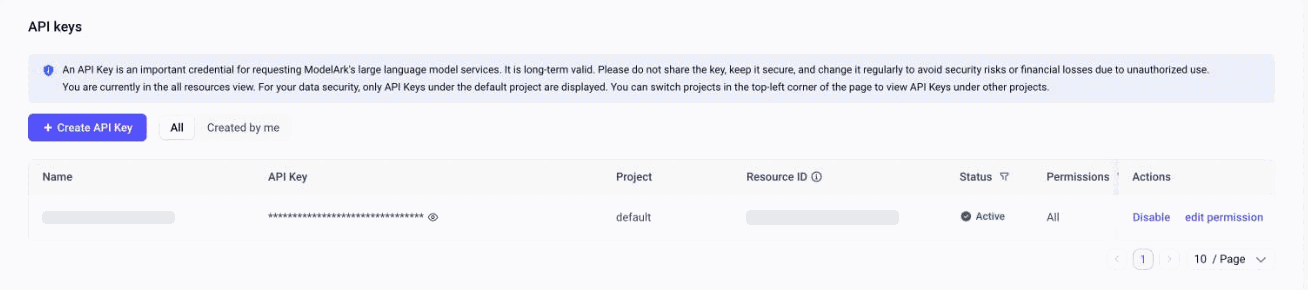
ModelArk → API keys: the Create API Key button sits above the list. -
Put money in — activation depends on it
Two options, and they are not equivalent:
- Top up the balance — pay-as-you-go, you are billed per token as you render. Simple, no commitment.
- Buy a resource package — a block of tokens at a lower rate. Cheaper per render, but a package is tied to one model variant: a package for Seedance 2.0 does not cover 2.0 Fast, Mini or 2.5.
Whichever you pick, this step is what makes the next one possible: model activation stays locked until the account holds a balance above $30 or a package.
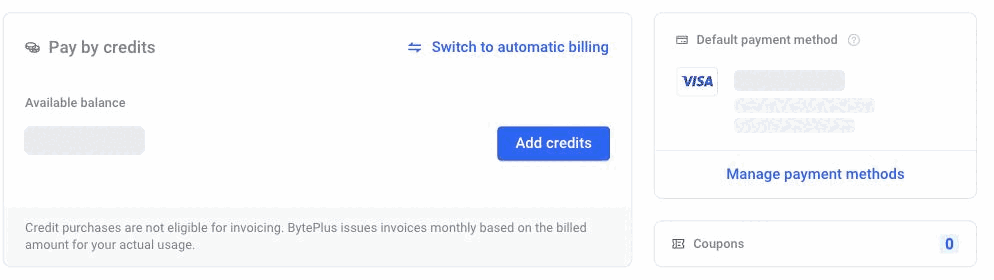
Billing center: Add credits tops the balance up; model activation unlocks from here. -
Activate the models
ModelArk → Model activation. Find and enable:
- Dreamina Seedance 2.0 — the main video model, this is what the studio shoots with by default
- Seedream — stills for the Art Dept and character mockup sheets
- Seedance 2.5 — optional: newer, takes up to 30s and 30 references, but costs about 1.5× more
Activation is per model. Enabling 2.0 does not enable 2.5, and enabling the main 2.0 does not enable Fast or Mini — each is a separate switch.
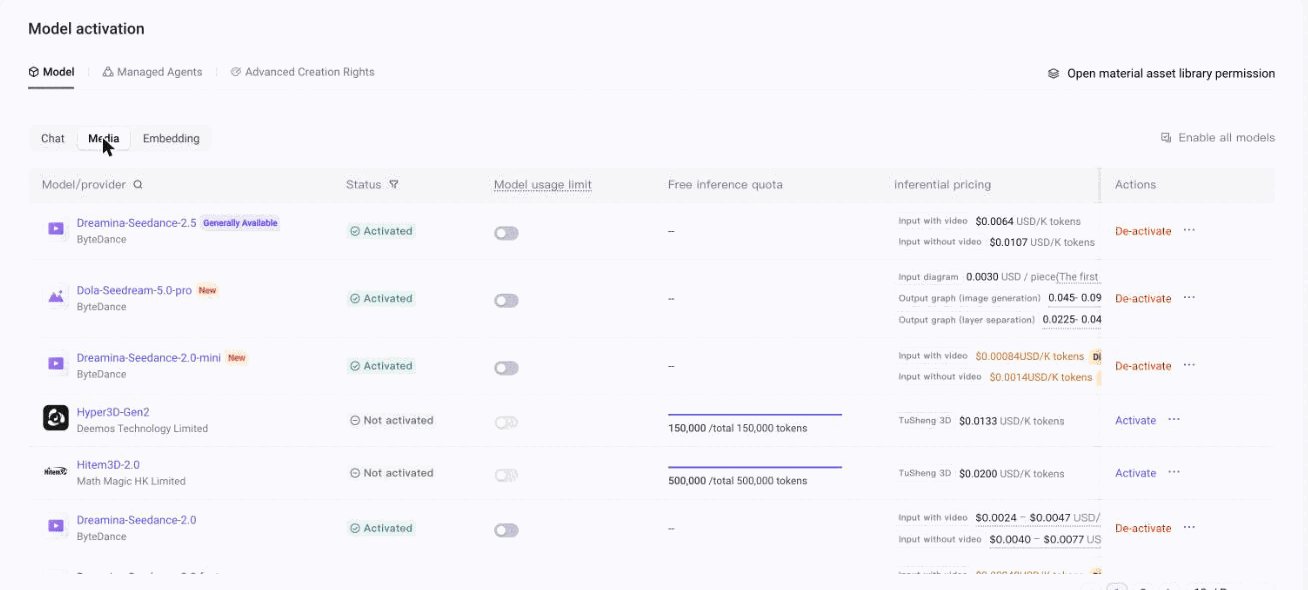
Model activation, the Media tab: each model has its own Activate switch. -
Shoot a cheap test
Back in the studio: a 5-second take at 480p with no references costs about $0.35 and proves the whole chain — key, activation, billing. Do this before anything expensive.
When something doesn't work
ModelNotOpenor "this model isn't enabled on your account yet"- The key is fine — the model is not activated. Go back to step 4. If the activation button itself is unavailable, the balance requirement in step 3 hasn't been met.
401or "invalid API key"- Either the key was copied with a stray space, or you pasted the key of a different BytePlus product. Voice sample generation uses a separate Seed Speech key — the ARK key is rejected there, and vice versa.
- "Your model plan or balance is exhausted"
- The package ran out or the balance hit zero. Note that BytePlus suspends the service about two hours after the balance goes negative.
- The image engine works but video doesn't
- Seedream is activated and Seedance isn't. They are different models with different switches on the same key.
- A reference photo is rejected as "may contain real person"
- Not a key problem — that is content moderation, and it refuses photorealistic humans from any source. A cartoon-styled character passes; a verified real-actor asset from the BytePlus asset library also passes.
Other keys the studio can use: